INFO
This page was translated by an LLM. Some details and nuances may differ from the original.
Controlling Execution
States
| State | Meaning |
|---|---|
SCHEDULED | Waiting for the first run or a retry |
QUEUED | Eligible to run, before the performer starts |
RUNNING | The performer is running |
COMPLETED | Succeeded. A terminal state with no transitions to other states |
FAILED | Failed up to the attempt limit. A manual retry moves it to SCHEDULED |
CANCELLED | Cancelled. A terminal state with no transitions to other states |
STALLED | Stopped without a reported result. Only a manual retry moves it to SCHEDULED |
attempts is the number of finished attempts.
A SCHEDULED job with attempts of 0 is waiting for its first run, and one with attempts of 1 or more is waiting for a retry.
Retry FAILED and STALLED jobs manually from the dashboard or the REST API.
Transitions
Cancelling a SCHEDULED job moves it to CANCELLED immediately.
A QUEUED or RUNNING job moves to CANCELLED when its deadline passes or when a cancellation during execution is confirmed.
Retries
Set the retry limit with maxAttempts and the retry interval with backoff.
Specify an integer of 1 or more for maxAttempts.
Specify backoff in one of two forms: fixed for a fixed interval or exponential for exponential backoff.
INFO
max_retries in wrangler.jsonc is a Queues setting. It does not affect Tsumugi retries.
Backoff
The default is the following exponential backoff.
{ kind: 'exponential', baseMs: 1_000, factor: 2, maxMs: 3_600_000, jitter: true }
To use a fixed interval, specify fixed for kind.
await tsumugi.enqueue(env, {
  binding: 'MAIL',
  payload,
  backoff: { kind: 'fixed', delayMs: 30_000, jitter: true },
});
With jitter: true, the retry times of many jobs that failed at the same moment are spread out.
To specify from the performer whether to retry and when to retry next, see Specifying a retry.
Execution Guarantees
guarantee is either at-least-once (default) or at-most-once.
The behavior for a job whose result is not reported depends on the value you choose.
| Guarantee | Behavior when no result is reported |
|---|---|
at-least-once (default) | Re-enqueued as SCHEDULED |
at-most-once | Moves to STALLED without being re-enqueued. Re-running is limited to manual retries |
await tsumugi.enqueue(env, {
  binding: 'CHARGE',
  payload,
  guarantee: 'at-most-once',
});
An at-most-once job is never executed twice.
In exchange, it takes longer to start running than an at-least-once job.
Timeouts and Unresponsive Jobs
An attempt that exceeds timeoutMs is treated as failed.
A TsumugiTimeoutError (job timed out (<jobId>, <timeoutMs>ms)) is recorded as the attempt's error.
The performer is not stopped after the timeout.
To abort the processing, see Aborting on timeout.
A QUEUED or RUNNING job is judged unresponsive when no attempt result is recorded within timeoutMs plus reaperGraceMs (default 30 seconds) from the start of execution (or from the last heartbeat).
An at-most-once job moves to STALLED regardless of the number of attempts.
An at-least-once job is re-enqueued if the number of attempts has not reached the limit, and moves to FAILED if it has.
Cancelling a Running Job
When you cancel a QUEUED or RUNNING job, a cancellation request to the performer is recorded.
Cancel from the dashboard or with POST /api/jobs/:id/cancel.
The response from this endpoint includes requested: true.
The performer checks for the request through cancelRequested, the return value of ctx.heartbeat().
To abort the processing, throw an exception and exit.
An attempt that fails after the request is not retried, and the job moves to CANCELLED.
const { cancelRequested } = await ctx.heartbeat(progress);
if (cancelRequested) throw new Error('cancelled');
If a success is reported before the request, the job stays COMPLETED and its result is also saved.
If no result is reported within reaperGraceMs (default 30 seconds) of the request, the job moves to CANCELLED.
The performer is not stopped, so a performer that does not check for the request keeps running.
Reports received after the job moves to CANCELLED are discarded.
A job waiting for a retry moves to CANCELLED without being re-enqueued.
An at-most-once job that has not yet run also moves to CANCELLED without being executed.
If you request reschedule for a job that already has a cancellation request, the REST API responds with 409.
A performer that does not call heartbeat never checks for the request.
Limiting Execution Volume
Four settings limit execution volume for each binding.
| Setting | Default | Description |
|---|---|---|
concurrency | 100 | Upper limit on the number of jobs running at the same time |
rate | null | Upper limit on the number of jobs run per unit of time. null means no limit |
perKeyConcurrency | 1 | Upper limit on concurrent runs for each concurrencyKey |
perKeyRate | null | Upper limit on the number of runs per unit of time for each concurrencyKey. null means no limit |
const tsumugi = defineTsumugi({
  performers,
  bindings: {
    MAIL: {
      policy: {
        concurrency: 20,
        rate: { tokens: 100, intervalMs: 60_000 },
        perKeyConcurrency: 1,
        perKeyRate: { tokens: 10, intervalMs: 60_000 },
      },
    },
  },
});
perKeyRate applies the same value to every key.
There is no setting for assigning a different value to each key.perKeyConcurrency and perKeyRate do not apply to jobs whose concurrencyKey is null.
Finding Why a Job Is Not Running
If an enqueued job does not run, check the response of GET /api/diagnostics to see which setting is limiting execution.
The response shows whether the cause is a pause, the concurrency limit, or the rate limit.
Changing Settings at Runtime
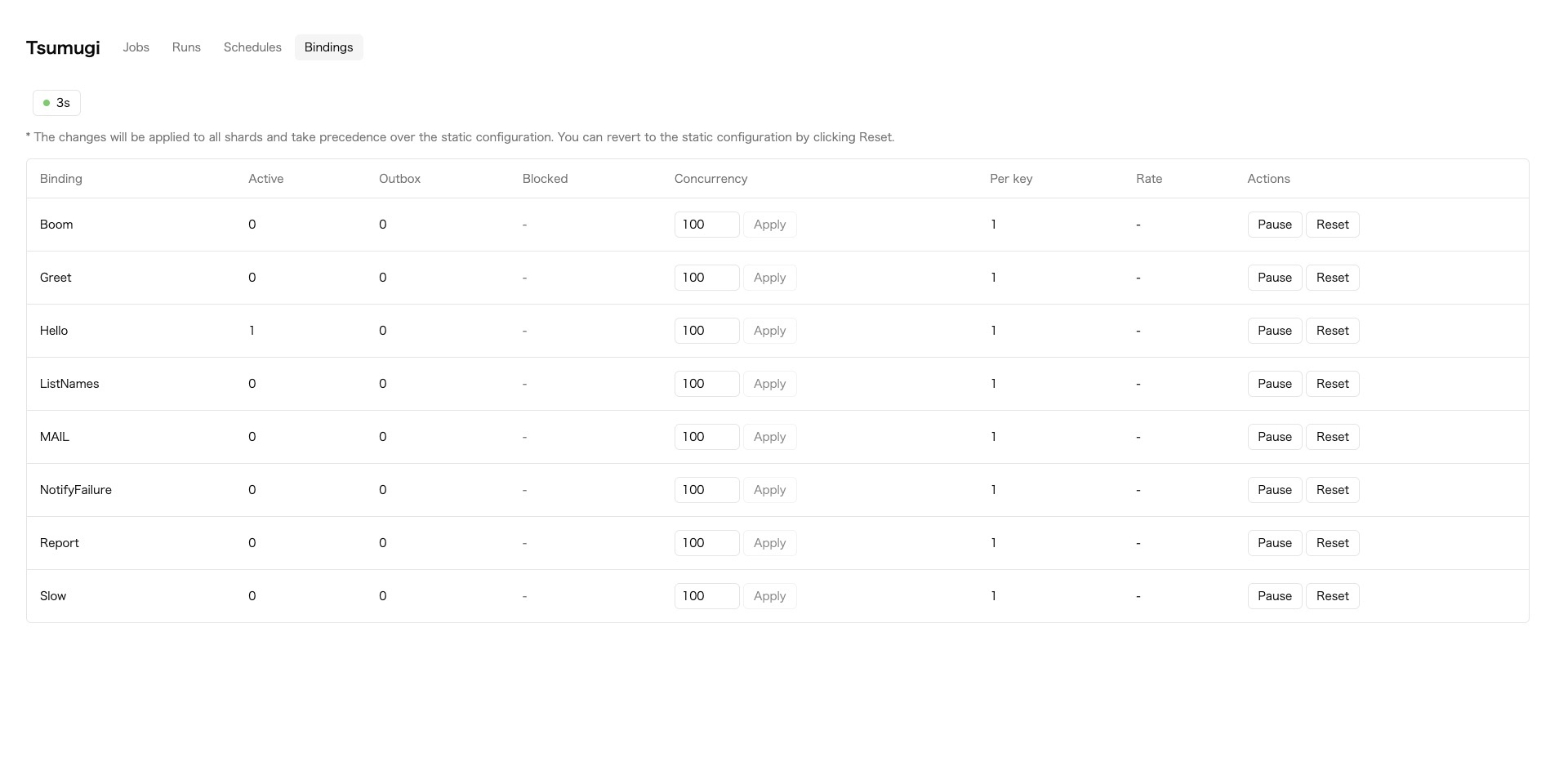
In the bindings tab of the dashboard, you can change the concurrency and pause enqueueing.
Changes do not require a deploy and apply to all shards of the binding.
This operation is equivalent to calling POST /api/bindings/:binding/policy.
curl -X POST -H "authorization: Bearer $TOKEN" -H 'content-type: application/json' \
  -d '{"paused": true}' https://example.com/api/bindings/MAIL/policy
After you resume, a lower-priority job that was waiting before the pause may run ahead of a higher-priority job enqueued later.
To change settings from code, call configure on the stub obtained with tsumugi.shardFor.configure changes the execution limits with policy, and the retention periods with sweepAfterMs and failedRetentionMs.
await tsumugi.shardFor(env, 'MAIL').configure({ policy: { concurrency: 5 } });
Settings changed at runtime take precedence over the bindings settings.
After that, the bindings settings are no longer applied.
To return to the bindings settings, call POST /api/bindings/:binding/policy/reset.
Alternatively, specify the original values again with configure.
Aging
If higher-priority jobs keep being enqueued, lower-priority jobs may never run.
To prevent this, the effective priority rises with waiting time.
This behavior is called aging, and it is applied by default.agingIntervalMs sets the interval at which priority rises, and its default is 60 seconds.
If you specify null, aging is not applied and jobs run strictly in priority order.
shard
A shard is a unit into which a binding's jobs are divided and managed.
The default number of shards is 1.
bindings: {
  MAIL: { shards: 4 },
}
If the number of shards is 2 or more, partitionKey is required, and omitting it raises an exception.
The scope of control by concurrencyKey and uniqueKey depends on the number of shards.
With one shard, all jobs in the binding are covered.
With two or more, only jobs in the same shard, selected by partitionKey, are covered.
When you use concurrencyKey or uniqueKey, specify the same key for partitionKey as well.
Setting different values does not cause an error, but jobs with the same key may be assigned to different shards.
As a result, concurrent execution or duplicate creation can occur.
Retention Periods
Finished jobs are deleted after a certain period.
| Target | Setting | Default |
|---|---|---|
COMPLETED / CANCELLED | sweepAfterMs | 5 minutes |
FAILED / STALLED | failedRetentionMs | 7 days |
A deleted job cannot be retried.
Specify both settings for each binding in bindings.
const tsumugi = defineTsumugi({
  performers,
  bindings: {
    MAIL: { sweepAfterMs: 60 * 60 * 1000, failedRetentionMs: 14 * 24 * 60 * 60 * 1000 },
  },
});
The period for which jobs appear in the dashboard and REST API lists is set separately from the retention periods, with retention.
When a cron trigger is configured, finished jobs and Runs older than that period are removed from the lists.
For details, see SweepOptions.
By default, the two periods match.
As a result, FAILED and STALLED jobs shown in the list can be retried.
If you change only one of the periods, the REST API may respond with 410 to a retry request even for a job shown in the list.
Failure Notifications
If you specify the name of the destination binding in onFailure, FAILED and STALLED jobs are notified to the specified performer.FAILED means a job that failed up to the attempt limit.STALLED means a job that stopped without a reported result.
const tsumugi = defineTsumugi({
  performers,
  onFailure: 'NotifyFailure',
});
The destination performer receives a FailureNotice as its argument.
import { Performer } from 'tsumugi/performer';
import type { FailureNotice } from 'tsumugi';

export class NotifyFailure extends Performer<FailureNotice, void, {}, Env> {
  async perform(notice: FailureNotice): Promise<void> {
    const res = await fetch(this.env.SLACK_WEBHOOK, {
      method: 'POST',
      body: JSON.stringify({ text: `${notice.binding} が失敗しました: ${notice.error}` }),
    });
    if (!res.ok) throw new Error(`notification failed: ${res.status}`);
  }
}
FailureNotice
| Name | Description |
|---|---|
jobId | ID of the failed job |
binding | binding of the failed job |
state | FAILED or STALLED |
attempts | Number of attempts made |
maxAttempts | Upper limit on the number of attempts |
error | Error from the last attempt. null if none was recorded |
runId | Run that enqueued the job. null for a job enqueued on its own |
nodeId | node that enqueued the job. null for a job enqueued on its own |
failedAt | Time of failure, in epoch milliseconds |
Jobs of all bindings are subject to notification.
Each notification runs as one job.
If a notification job fails, that job appears in the list.
A notification job is also retried like any other job.
Failures of jobs in the destination binding itself are not notified.
Jobs that failed before onFailure was specified are not covered.
Settlement Notifications
If you specify onSettled, jobs that have finished, not only failed ones, are notified to the specified performer.
Specify the states to notify in states, choosing from COMPLETED, FAILED, CANCELLED, and STALLED.states is required. An empty array or an invalid state raises an exception in defineTsumugi.
const tsumugi = defineTsumugi({
  performers,
  onSettled: {
    binding: 'NotifySettled',
    states: ['COMPLETED', 'FAILED', 'CANCELLED', 'STALLED'],
  },
});
If you include COMPLETED, as many notification jobs are enqueued as there are completed jobs.
Check the number of jobs before you specify it.
The destination performer receives a SettledNotice as its argument.
SettledNotice
| Name | Description |
|---|---|
jobId | ID of the finished job |
binding | binding of the finished job |
state | State at the time it finished |
attempts | Number of attempts made |
maxAttempts | Upper limit on the number of attempts |
error | Error from the last attempt. null if the job finished in a state other than failure, or if none was recorded |
result | Return value of perform. null for states other than COMPLETED, or if the storage limit was exceeded |
runId | Run that enqueued the job. null for a job enqueued on its own |
nodeId | node that enqueued the job. null for a job enqueued on its own |
settledAt | Time the job finished, in epoch milliseconds |
Jobs in the destination binding itself and jobs in the onFailure destination binding are not notified.
If you specify both onFailure and onSettled, FAILED and STALLED jobs included in states are notified to both destinations.
Jobs that finished before onSettled was specified are not covered.
Defaults at Enqueue Time
If you specify onEnqueue, it is called each time a job is enqueued, and its return value is used as the default execution options.
Values specified by the caller always take precedence, and the defaults apply only to options that are not explicitly set.
const tsumugi = defineTsumugi({
  performers,
  onEnqueue: (input) => (input.binding === 'SlowJob' ? { timeoutMs: 300_000 } : undefined),
});
The execution options that can have defaults are traceparent, priority, maxAttempts, backoff, timeoutMs, guarantee, delayMs, runAt, expiresAt, expiresInMs, and concurrencyKey.binding, payload, uniqueKey, uniqueForMs, and partitionKey are not covered.
onEnqueue is not applied to the notification jobs of onFailure and onSettled.
To apply it to jobs enqueued from another Worker as well, pass the same function to createClient.
Published: Last updated: