INFO
This page was translated by an LLM. Some details and nuances may differ from the original.
Scheduled Execution
Tsumugi runs the jobs and Flows defined in schedules at a fixed interval or at times specified by a cron expression.
Definition
const tsumugi = defineTsumugi({
  performers,
  flows,
  schedules: {
    'poll-inbox': { binding: 'PollInbox', payload: {}, everyMs: 5 * 60 * 1000 },
    nightly: {
      flow: 'REPORT',
      input: ({ scheduledAt }) => ({ until: scheduledAt }),
      cron: '0 9 * * *',
      timeZone: 'Asia/Tokyo',
    },
  },
  auth: /* ... */,
});
The key sets the name of a schedule.
Names may contain alphanumeric characters, hyphens, and underscores, and must be 64 characters or fewer.
Specifying binding enqueues a job, and specifying flow starts a Run.
Specify one or the other.
The types of payload and input are derived from performers and flows, as they are when you enqueue a standalone job or start a Run.
If the target binding has two or more shards, partitionKey is also required.
payload and input also accept a function instead of a value.
A function is called on every execution, and its return value is used.
The scheduledAt argument is the scheduled time of that occurrence.
{ binding: 'Sync', payload: ({ scheduledAt }) => ({ since: scheduledAt - 60_000 }), everyMs: 60_000 }
A schedule that enqueues jobs can optionally include options such as maxAttempts, backoff, timeoutMs, priority, and concurrencyKey.
A schedule that starts Runs can optionally include deadlineMs.
A schedule definition cannot use uniqueKey, delayMs, or runAt.
If a definition is invalid, defineTsumugi throws an exception when it is called.
This applies when a name violates the naming rules, or when both binding and flow are specified or neither is.
An exception is also thrown when the target binding has two or more shards and partitionKey is omitted, or when an unsupported option is specified.
Execution Interval
Specify one of everyMs and cron.
If you specify both or neither, a definition error occurs.
everyMs
Specify an integer of 1000 or more (in milliseconds) for everyMs.
If you specify a value less than 1000, a definition error occurs.
The first execution happens one interval after the schedule is registered.
After that, executions happen at times obtained by adding one interval at a time to the first scheduled time.
cron
cron is specified with five fields: minute, hour, day of month, month, and day of week.
The precision is one minute, and there are no fields for seconds or years.
0 3 * * *     Every day at 3:00
*/15 * * * *  Every 15 minutes
0 0 1 * *     At 0:00 on the 1st of every month
0 9 * * 1-5   At 9:00 from Monday to Friday
The supported syntax is numbers, *, ,, -, and /.
Names such as JAN and MON cannot be used.
If you specify an expression that never occurs, such as February 31, a definition error occurs.
If you specify both the day of month and the day of week, the schedule runs when either one matches.
A day-of-month or day-of-week field that starts with *, such as */2, is treated as unspecified.
In that case, the schedule runs on days when both the day of month and the day of week match.
timeZone
If you specify an IANA time zone in timeZone, that time zone is applied when cron is interpreted.
If omitted, UTC is used.
Specifying a fixed offset such as +09:00 causes a definition error.
{ binding: 'OpenShop', payload: {}, cron: '0 9 * * 1-5', timeZone: 'Asia/Tokyo' }
Use timeZone together with cron.
If you specify it together with everyMs, a definition error occurs.everyMs is calculated from the difference between times, so it is not affected by time zones.
An occurrence whose local time does not exist because of a daylight saving time change is not executed.
If the same local time occurs twice, only the first occurrence is executed.
When the Previous Execution Has Not Finished
overlap specifies what happens when the next scheduled time arrives before the previous execution has completed.
The value is either 'skip' or 'overlap', and the default is 'skip'.
If you set any other value, a definition error occurs.
| Value | Behavior |
|---|---|
'skip' | Skips that occurrence. Default |
'overlap' | Executes regardless of the state of the previous execution |
If the previous job is in the SCHEDULED, QUEUED, or RUNNING state, that execution is considered unfinished.
For a Run, the previous Run is unfinished if it is RUNNING.
The number of occurrences that were not executed is shown in the dashboard list.
{ binding: 'Crawl', payload: {}, everyMs: 60_000, overlap: 'overlap' }
Execution Delays
Load or a deployment can cause an execution to run later than its scheduled time.
If a delay spans several intervals, the oldest missed occurrence is executed once, and the remaining occurrences are not executed.
The next scheduled time is the first scheduled time after the current time.
Even after a delay, scheduled times remain the first scheduled time plus a multiple of the interval.
Preventing Duplicate Execution
An occurrence with the same scheduled time is never executed twice.
On a second execution attempt, no new job or Run is created, and the ID of the existing job or Run is reused.
This mechanism is why uniqueKey cannot be used in a schedule definition.
If it were specified, all occurrences within the deduplication window would be treated as the same job as the first one.
Failures
An occurrence is not executed if the payload or input function throws an exception.
An occurrence is likewise not executed if enqueuing the job or starting the Run fails.
The reason for the failure is recorded, and that occurrence is not retried.
The failure does not affect the execution of other schedules.
List
The schedules tab of the dashboard shows a list of the defined schedules.
You can retrieve the same list with GET /api/schedules.
It includes the next scheduled time, the previous execution, the number of occurrences that were not executed, the reason for the failure, and the pause state.
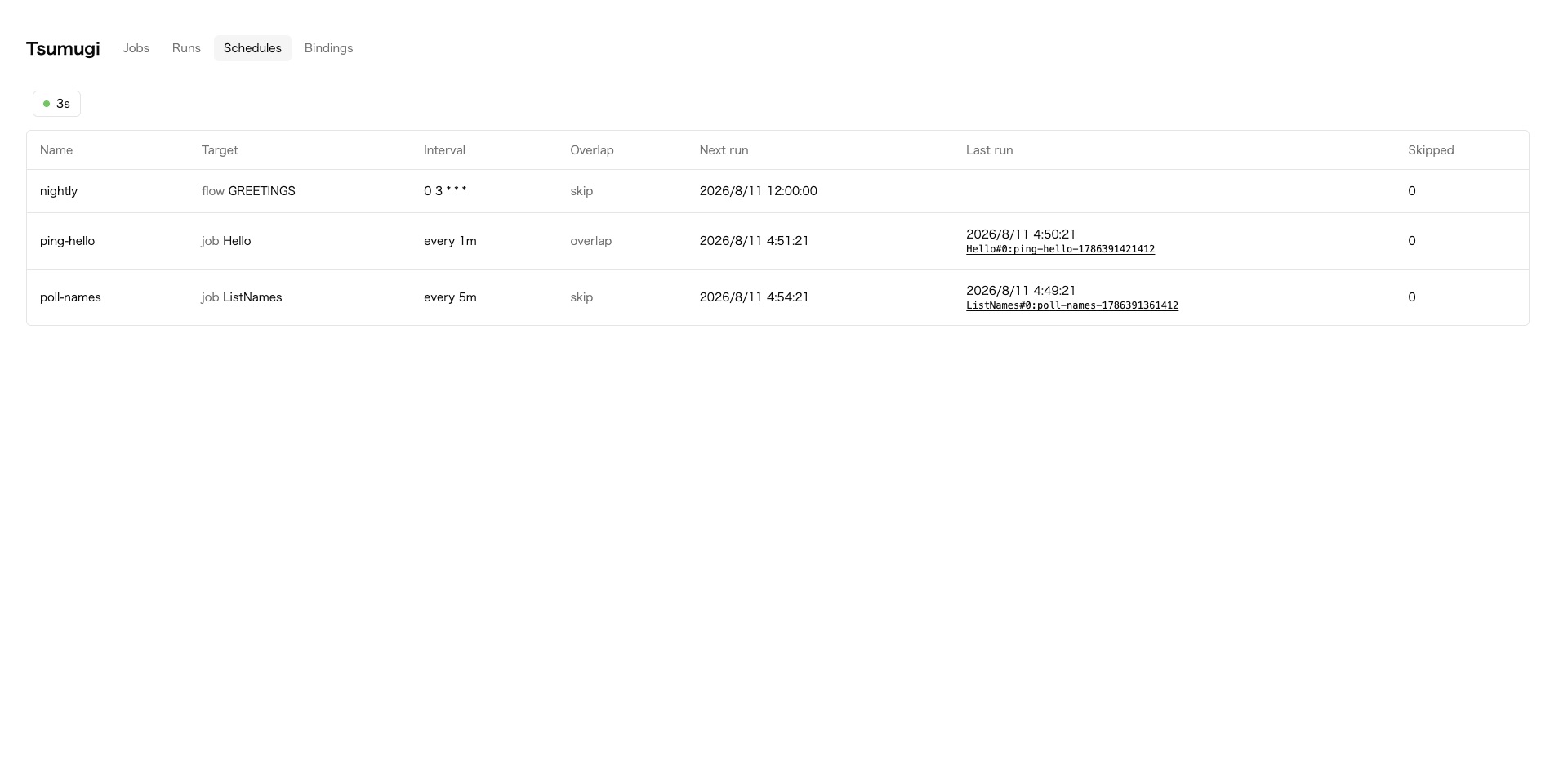
Times are displayed together with the IANA time zone set for the schedule and the GMT offset at that time.
Pausing and Resuming
You can pause and resume scheduled execution for each schedule from the schedules tab of the dashboard, or with POST /api/schedules/:name/pause and POST /api/schedules/:name/resume.
While a schedule is paused, its executions are suppressed.
Occurrences whose scheduled time passes during the pause are not executed after the schedule resumes.
The first execution after resuming is at the first scheduled time after the moment of resuming.
Jobs that were enqueued before the pause are not affected.
Pausing a schedule is a separate setting from the paused setting of a binding.
Pausing a binding stops the execution of all jobs enqueued to that binding.
Pausing a schedule stops only the executions of that schedule.
Manual Execution
You can run a schedule once at any time with "Run now" in the schedules tab of the dashboard, or with POST /api/schedules/:name/trigger.
Paused schedules can also be triggered.overlap is not evaluated, and the next regular execution time does not change.
The scheduledAt received by the payload and input functions is the time of the manual execution.
Start Conditions
Scheduled execution starts when the Worker first receives an HTTP request, a queue message, or a cron trigger after deployment.
After that, executions continue even without external calls.
In a setup with no external access, the cron trigger that you configure for the list retention period fulfills that role.
If you change the definitions and deploy, the changes take effect from the next occurrence.
Configuration
When you specify schedules, add the following two entries to your wrangler configuration.
If you do not specify schedules, these settings are not needed.
{
  "durable_objects": {
    "bindings": [
      { "name": "JOB_SHARD", "class_name": "TsumugiJobShard" },
      { "name": "SCHEDULER", "class_name": "TsumugiScheduler" },
    ],
  },
  "migrations": [
    { "tag": "v1", "new_sqlite_classes": ["TsumugiJobShard"] },
    { "tag": "v3", "new_sqlite_classes": ["TsumugiScheduler"] },
  ],
}
Export TsumugiScheduler as a class that extends the schedulerClass returned by defineTsumugi.
The class name must match the one in the wrangler configuration.
export { TsumugiJobShard } from 'tsumugi';
export class TsumugiScheduler extends tsumugi.schedulerClass {}
Published: Last updated: